I am sure you know that to get traffic from
StumbleUpon, your blog post needs to receive sufficient
"thumb up" from fellow stumblers, so that your blog post will have a higher chance to appear in front of other stumblers' monitor screen when they click the "stumble" button from the StumbleUpon toolbar.
 The StumbleUpon Toolbar for Firefox
Do you exchange stumbles?Exchanging stumbles on StumbleUpon is a technique that has been used by many bloggers throughout the blogosphere to generate extra traffics to their blogs. You stumble other people's website or blog and they will return the favor by stumbling yours.
If you done the stumble exchanging thingie manually, it might consumes a lot of time. Therefore, I am strongly recommended you these
3 awesome stumble exchange services that will organize your stumbling process and drive massive traffic to your blog.
1. StumbleXchange

In StumbleXchange, you can stumbles unlimited sites and receive unlimited stumbles in return. You will be shown 10 random sites to stumble each time you click the "stumble" link. Other people will stumble your page using the the way too.
2. Piqq.us Piqqus.com
Piqq.us Piqqus.com is not just a site to exchange stumbles but also for exchanging digg and propeller. To get StumblePoint (as well as DiggPoint and Propelpoint), you need to stumble the available opportunities. When you get sufficient StumblePoints, you can post your blog entry under the campaigns section to receive stumbles. Membership for Piqq.us can only be obtained by invitation.
If you are interested to join, feel free to grab the invitation link below.
http://piqqus.com/signup.php?r=3825&c=ccbmmk3hyt47d9d731a6
http://piqqus.com/signup.php?r=3825&c=166exkvgtz47d3cde2ee
http://piqqus.com/signup.php?r=3825&c=7e9d8hjd5q47d310bd3c
3. StumbleUdon
StumbleUdon is my favourite stumble exchange service because they will automated the stumbling process for us ( We don't need to visit the site and click the "thumb up", StumbleUdon will do it for us). To register with StumbleUdon, you need to get an invitation link. You can earn a minimum of 5 credits per day. With the credits earned, you can convert the credits into stumbles for your post. Before joining, do make sure that you have at least 10 (ten) mutual friends in your StumbleUpon account.
Here is the StumbleUdon invitation link :
http://stumbleudon.com/signup.php?r=306&c=ddcjodqvja47d4a012bc
http://stumbleudon.com/signup.php?r=306&c=80cv8oav5m47d3cd488c
http://stumbleudon.com/signup.php?r=306&c=064h9bry8s47d30ff15d
http://stumbleudon.com/signup.php?r=306&c=cb9prfyqtl47c3d8fe45
Note : If the invitation link is not working, feel free to leave a comment here or email me at steveyu85[at]gmail[dot]com . I will give you the new invitation link.
P.S. : This is the link to my StumbleUpon account. Feel free to add me! :-)
(Read More...)
Labels:
Tips n Tricks,
Web Tool

Do you share your computer or laptop with your other family members or friends? If yes, then you are risking your private data from unauthorized access or your data may get deleted by mistake. I am sure that you don't want other peoples to peep into your confidential things, right? I don't like either. Therefore,
folder protection tool is crucial to keep your data safe.
Here I have highlighted a score of folder protection applications that works on
Windows platform PC and the best thing about these tools are that they are absolutely
FREE!!!
1. Folder Protection
Folder Protection is a powerful and easy-to-use program for encrypting and protecting your data. You can encrypt any folder including flash disk and removable hard disk.

Download Folder Protection v4.8 Now | 366KB
2. Free Hide Folder
It's actually very easy to hide a folder with Free Hide Folder. It takes only a few mouse clicks. First, you need to run Free Hide Folder, locate and select the folder you want to hide, and then click Hide Folder button to hide folders.

Download Free Hide Folder Now | 742KB
3. My Lockbox
My Lockbox is extremely easy to use. You can set the lockbox location and the password during the setup procedure. After the setup is done, lockbox will be hidden and locked until you enter the valid password. My Lockbox Control Panel allows you easily change basic lockbox parameters: lockbox location, protection status, password.
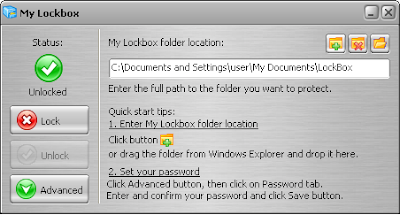
Download My Lockbox Now | 1.27MB
4. Folder Latch

Download Folder Latch 6.0.0.5 | 1.43MB
5. Microsoft Private Folder
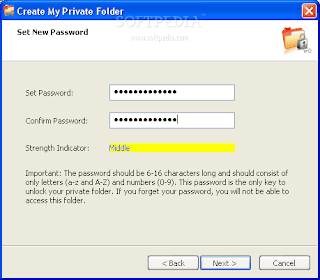
Note : Microsoft Private Folder is provided specifically for genuine Windows customers, and requires genuine Windows validation in order to download.
Download Microsoft Private Folder | 1.06MB
P.S. : Oh yes, don't forget to protect your priceless xxx movies collections. :-)
(Read More...)
Labels:
Freeware,
Tips n Tricks
I often came across a lot of interesting webpages while blog walking but sometime I found so little time to read them all at that time. So in the end I have to skip some of the posts and some of it I bookmarked, so that I can read it later. That was what I did last time, but now I am using
toread.

Toread is a email-based free bookmark service that allows you to send webpages to your email account.
This bookmark service is available for both IE and Firefox users. Toread come in handy when you came across a hand full of interesting blog posts but couldn't find the time to read at the very moment. So by simply click on the "toread" bookmarklet, the webpage will be forwarded to your email account. When you are free, you can always read the previous bookmarked webpages from your email.

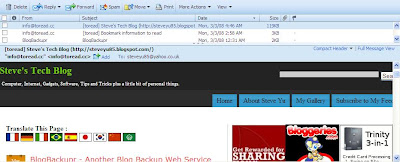
Here is a screenshot of the email containing the webpage (it's my blog actually) that I've bookmarked using Toread.
Toread Mobile / Tomobi
Toread also available to mobile users. Tomobi will convert toread web page into text-only content, and send it to your mobile device.
Check out toread @ toread.cc | For additional info, please refer to toread "how to use" page.
(Read More...)
Labels:
Internet,
Web Tool
I have covered about
BlogBackupOnline some time ago. Well, BlogBackupOnline is not the only blog backup service available online. It has a friend, named
BlogBackupr. Basically, these two blog backup services are quite similar. So you may want to choose only one blog backup service to do the backup.

Here is several items to take note about BlogBackupr.
- BlogBackupr works for all blogs that have a RSS-feed (Blogger and Wordpress's blog are included)
- The backup will include all posts, comments and categories
- Doesn't backup media files e.g. images and blog template. (This service may available in the future.)
- Will automatically performs a daily incremental backup
- You can export your blog to desktop in XML, HTML or TXT format.
- Support automatic restore to your Blogger or Wordpress blog.
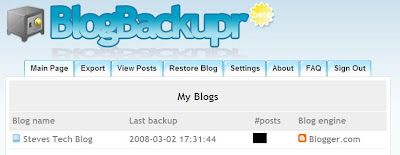 The Dashboard
The features offer by both BlogBackupOnline and BlogBackupr are similar except that BlogBackupOnline supports media files backup while the other doesn't. So that's what differentiate both services. So,
I go for BlogBackupOnline.
And you?
(Read More...)
Labels:
Blogging,
Internet,
Tips n Tricks
So have you read today's newspaper? Well, you should must read it. It has nothing to do with the coming Malaysia's general election (I am not interested on that though). It’s about my blog new Google Page Rank! Yes, finally my blog get it’s first Page Rank from Google. I started this blog on the end of November and after three months waiting for my first Page Rank update, the day has finally come and here is my new Page Rank, from ZERO to FOUR (unofficial)!
Here is the piece of news that I am yelling about just now, in case you want to read it. Just read the headline. :-)
 Anyone getting the New Page Rank update?
Have your blog receive the new Google Page Rank? If yes, share your good news with me! And praise me also. I love that!
P.S. : I've tried to confirm my Google Page Rank on major datacenters using iwebtool but the results are not as what I expected. Maybe it's too early for me to celebrate. :-(
(Read More...)
Labels:
Uncategorized


