My blog has moved!

You should be automatically redirected in 6 seconds. If not, visit
My Tech Quest
and update your bookmarks.

Translate This Page :

Showing posts with label Tips n Tricks. Show all posts

NowTorrents - Find the Best Torrents on the Web

2 comments - Post a comment

NowTorrents - Find the Best Torrents on the Web

When you are looking for webpages on the net , you ask Mr Google, Yahoo and any other available search engines. But if you are looking for the best torrent files in the town, you gotta ask this fellow, NowTorrents.


NowTorrents is an advanced real-time search engine for bit-torrents. We do not host any torrents on NowTorrents, we just make them findable. Our software scans the largest torrent hosting websites on the internet and comes up with the best results from these websites.


The torrent hosting websites that are included in the torrent search are :
  • Mininova
  • BitTorrent
  • PirateBay
  • IsoHunt
  • Monova
  • NewTorrents
  • SeedPeer
  • LegitTorrents
  • TorrentZ
  • MyBitTorrent
  • FullDlls
  • Fenopy
  • BtJunkie
  • Sumotorrent

Here is an example of the torrent search result for keyword, "Lost". My favourite TV series besides Prison Break and Heroes. :-)


NowTorrents - Find the Best Torrents on the Web
Which one is better NowTorrents or PizzaTorrent?

Check out NowTorrents @ nowtorrents.com

(Read More...)

Bookmark this post:
Ma.gnolia DiggIt! Del.icio.us Blinklist Yahoo Furl Technorati Simpy Spurl Reddit Google

How to Convert Webpage to PDF Directly from the Web?

3 comments - Post a comment

How to Convert Webpage to PDF?


What do you do when you found an interesting webpage and decided to keep a copy of the webpage on your desktop? The usual way is using the "save page as" feature on your browser to save your favourite webpage to .htm/.html or text file format. But isn't it better to convert the webpage to PDF format?

htm2pdf is a free web-based service that helps you convert your favourite webpages to PDFs.


How to Convert Webpage to PDF?
Simply copy and paste your preferred webpage url in the provided box in htm2pdf. Then click "Convert to PDF" to convert the webpage to PDF. Once the conversion finished, you will be given a link to download the PDF file.

Here is an example of the PDF-formatted-webpage.

How to Convert Webpage to PDF?
Check out htm2pdf @ htm2pdf.co.uk

(Read More...)

Bookmark this post:
Ma.gnolia DiggIt! Del.icio.us Blinklist Yahoo Furl Technorati Simpy Spurl Reddit Google

3 Great Tools to Get StumbleUpon Traffic to Your Blog

10 comments - Post a comment

I am sure you know that to get traffic from StumbleUpon, your blog post needs to receive sufficient "thumb up" from fellow stumblers, so that your blog post will have a higher chance to appear in front of other stumblers' monitor screen when they click the "stumble" button from the StumbleUpon toolbar.

The StumbleUpon Toolbar for FirefoxThe StumbleUpon Toolbar for Firefox


Do you exchange stumbles?

Exchanging stumbles on StumbleUpon is a technique that has been used by many bloggers throughout the blogosphere to generate extra traffics to their blogs. You stumble other people's website or blog and they will return the favor by stumbling yours.

If you done the stumble exchanging thingie manually, it might consumes a lot of time. Therefore, I am strongly recommended you these 3 awesome stumble exchange services that will organize your stumbling process and drive massive traffic to your blog.

1. StumbleXchange


Get StumbleUpon Traffic to Your Blog
In StumbleXchange, you can stumbles unlimited sites and receive unlimited stumbles in return. You will be shown 10 random sites to stumble each time you click the "stumble" link. Other people will stumble your page using the the way too.

2. Piqq.us Piqqus.com

Piqq.us Piqqus.com is not just a site to exchange stumbles but also for exchanging digg and propeller. To get StumblePoint (as well as DiggPoint and Propelpoint), you need to stumble the available opportunities. When you get sufficient StumblePoints, you can post your blog entry under the campaigns section to receive stumbles. Membership for Piqq.us can only be obtained by invitation.

If you are interested to join, feel free to grab the invitation link below.

http://piqqus.com/signup.php?r=3825&c=ccbmmk3hyt47d9d731a6

http://piqqus.com/signup.php?r=3825&c=166exkvgtz47d3cde2ee

http://piqqus.com/signup.php?r=3825&c=7e9d8hjd5q47d310bd3c


3. StumbleUdon

StumbleUdon is my favourite stumble exchange service because they will automated the stumbling process for us ( We don't need to visit the site and click the "thumb up", StumbleUdon will do it for us). To register with StumbleUdon, you need to get an invitation link. You can earn a minimum of 5 credits per day. With the credits earned, you can convert the credits into stumbles for your post. Before joining, do make sure that you have at least 10 (ten) mutual friends in your StumbleUpon account.

Here is the StumbleUdon invitation link :

http://stumbleudon.com/signup.php?r=306&c=ddcjodqvja47d4a012bc

http://stumbleudon.com/signup.php?r=306&c=80cv8oav5m47d3cd488c

http://stumbleudon.com/signup.php?r=306&c=064h9bry8s47d30ff15d

http://stumbleudon.com/signup.php?r=306&c=cb9prfyqtl47c3d8fe45


Note : If the invitation link is not working, feel free to leave a comment here or email me at steveyu85[at]gmail[dot]com . I will give you the new invitation link.

P.S. : This is the link to my StumbleUpon account. Feel free to add me! :-)

(Read More...)

Bookmark this post:
Ma.gnolia DiggIt! Del.icio.us Blinklist Yahoo Furl Technorati Simpy Spurl Reddit Google

5 Free Tools to Lock/Hide Your Files and Folders With Ease

5 comments - Post a comment

Tools to Lock/Hide Your Files and FoldersDo you share your computer or laptop with your other family members or friends? If yes, then you are risking your private data from unauthorized access or your data may get deleted by mistake. I am sure that you don't want other peoples to peep into your confidential things, right? I don't like either. Therefore, folder protection tool is crucial to keep your data safe.

Here I have highlighted a score of folder protection applications that works on Windows platform PC and the best thing about these tools are that they are absolutely FREE!!!

1. Folder Protection

Folder Protection is a powerful and easy-to-use program for encrypting and protecting your data. You can encrypt any folder including flash disk and removable hard disk.


Tools to Lock/Hide Your Files and Folders

Download Folder Protection v4.8 Now | 366KB


2. Free Hide Folder

It's actually very easy to hide a folder with Free Hide Folder. It takes only a few mouse clicks. First, you need to run Free Hide Folder, locate and select the folder you want to hide, and then click Hide Folder button to hide folders.


Tools to Lock/Hide Your Files and Folders

Download Free Hide Folder Now | 742KB


3. My Lockbox

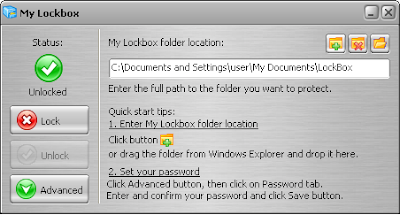
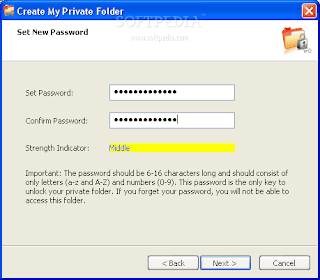
My Lockbox is extremely easy to use. You can set the lockbox location and the password during the setup procedure. After the setup is done, lockbox will be hidden and locked until you enter the valid password. My Lockbox Control Panel allows you easily change basic lockbox parameters: lockbox location, protection status, password.

Tools to Lock/Hide Your Files and Folders
Download My Lockbox Now | 1.27MB


4. Folder Latch


Tools to Lock/Hide Your Files and Folders

Download Folder Latch 6.0.0.5 | 1.43MB


5. Microsoft Private Folder


Tools to Lock/Hide Your Files and Folders
Note : Microsoft Private Folder is provided specifically for genuine Windows customers, and requires genuine Windows validation in order to download.

Download Microsoft Private Folder | 1.06MB


P.S. : Oh yes, don't forget to protect your priceless xxx movies collections. :-)

(Read More...)

Bookmark this post:
Ma.gnolia DiggIt! Del.icio.us Blinklist Yahoo Furl Technorati Simpy Spurl Reddit Google

BlogBackupr - Another Blog Backup Web Service

2 comments - Post a comment

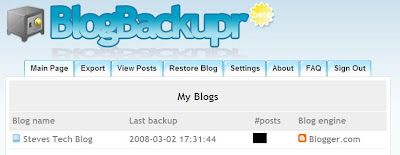
I have covered about BlogBackupOnline some time ago. Well, BlogBackupOnline is not the only blog backup service available online. It has a friend, named BlogBackupr. Basically, these two blog backup services are quite similar. So you may want to choose only one blog backup service to do the backup.

Backup Blog Online
Here is several items to take note about BlogBackupr.
  • BlogBackupr works for all blogs that have a RSS-feed (Blogger and Wordpress's blog are included)
  • The backup will include all posts, comments and categories
  • Doesn't backup media files e.g. images and blog template. (This service may available in the future.)
  • Will automatically performs a daily incremental backup
  • You can export your blog to desktop in XML, HTML or TXT format.
  • Support automatic restore to your Blogger or Wordpress blog.

Backup Blog OnlineThe Dashboard

Which one do I Choose?
The features offer by both BlogBackupOnline and BlogBackupr are similar except that BlogBackupOnline supports media files backup while the other doesn't. So that's what differentiate both services. So, I go for BlogBackupOnline.

And you?

(Read More...)

Bookmark this post:
Ma.gnolia DiggIt! Del.icio.us Blinklist Yahoo Furl Technorati Simpy Spurl Reddit Google

The Quickest Way to Eject Your USB Gadgets

5 comments - Post a comment

Other than using Unlocker , there is another good alternative to eject my USB flash drive with ease and forget about the frustrating moment seeing the error message from Windows' default device removal tool.

USB Disk Ejector
USB Disk Ejector is a free Windows application that allow us to quickly eject our USB flash drives and any other USB devices in Windows. USB Disk Ejector also come in handy when we have a couple of USB devices to remove. I hate the slow normal way to eject my USB device, especially when I have more than one USB devices to remove, I am sure you don't want to waste time on that right?

How to use the USB Disk Ejector?
Get yourselves a copy of USB Disk Ejector. Once downloaded, extract the freeware to your desktop. To eject your USB devices, simply open the USB Disk Ejector and you will see the similar image below. Follow the given instruction as displayed and you're done!


USB Disk Ejector
If you have problem to eject your usb gadgets (seeing the error messages) and would love to save time when you have a handful of usb gadgets to eject, you should give USB Disk Ejector a try or else just stick with the usual method. :-)

Credit : MohdHafez.net

(Read More...)

Bookmark this post:
Ma.gnolia DiggIt! Del.icio.us Blinklist Yahoo Furl Technorati Simpy Spurl Reddit Google

How to Unlock Stubborn Shared Files With Ease?

4 comments - Post a comment

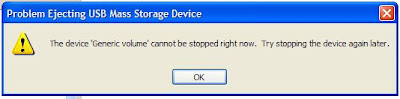
I always have the problem to eject my external hard disk from my laptop. So I already get used to this error message which was kind of annoying sometime.


How to Unlock Stubborn Shared Files With Ease?

How to Unlock Stubborn Shared Files With Ease?The solutions that I always used are by unplugging the external hard disk directly even though I get the error message or turn off the computer and unplug it later.
But now I have a better solution to fight this problem. I am using a free Windows application called the Unlocker, purposely used to delete locked files with error messages.

Other than the above error message, Unlocker also works fine to get rid of the following type of error messages.


How to Unlock Stubborn Shared Files With Ease?
and these too :

Cannot delete file: Access is denied
There has been a sharing violation.
The source or destination file may be in use.
The file is in use by another program or user.
Make sure the disk is not full or write-protected and that the file is not currently in use.

How to use the Unlocker?
Once you have the Unlocker installed, simply right click on the file or folder with the error message and click Unlocker. You will see a pop-up dialog box, click Unlock All and you’re done!

Wanna give a try?

Credit : FriedBeef

(Read More...)

Bookmark this post:
Ma.gnolia DiggIt! Del.icio.us Blinklist Yahoo Furl Technorati Simpy Spurl Reddit Google

How to Back Up Your Blogger Blog Online?

9 comments - Post a comment

Nobody wish to see their blog turn into disaster the next day and can't do anything to rescue it because they never run blog backup the day before. So blog backup is crucial because we never know what going to happen to our blog the next day. Trying to manually back up your blog is complex and time consuming, you sure don't want spend a lot of time on it right?

Back Up Blogger Blog OnlineSo if you are looking for a web service that can help you backup your entire blog content with ease, BlogBackupOnline is the answer. You'll only need to set up BlogBackupOnline once, and then you stop worrying about back up ever again because BlogBackupOnline will manage all the backup tasks for you.

Back Up Your Blogger Blog Online
The sign up process is quick and simple, all you need to do is fill up the sign up form, register your blog and ready to start your first full blog backup. If you want to backup image files, make sure you check the option shown below.

Back Up Blogger Blog Online
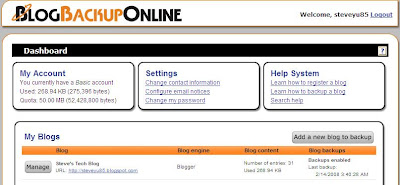
After the full backup has completed, you will then be able to manage the backup of the blog from the dashboard. BlogBackupOnline will automatically performs a daily incremental backup to find new posts, new comments, and other changed content.

Back up blogger blog online
Export Your Blog to Desktop
You don't get unlimited storage to store all your blog back up files on the web. You are only allocated 50 mb for the back up purpose. So you might want to export your blog to desktop. Here's how. From the dashboard, click the "Manage" button for the specific blog that you want to export. Then select the "Export" tab and click the "Download export file" button. If in case you do run out of space, you can always ask for more space by emailing BlogBackupOnline at morespace [at] techrigy [dot] com.

Back Up Blogger Blog Online
Happy Trying!

(Read More...)

Bookmark this post:
Ma.gnolia DiggIt! Del.icio.us Blinklist Yahoo Furl Technorati Simpy Spurl Reddit Google

Create Free Flash Based Screensavers with InstantStorm

4 comments - Post a comment

Previously, I have shown you how to convert flash movie into a windows-based screensaver by using a free web service, called Creamshavers. Besides creating your flash based screensavers directly from the web, you also can choose to do it from your desktop. All you need is InstantStorm.


InstantStorm - Flash to Screensaver Converter

InstantStorm is a Windows freeware tool for creating Flash based screensavers with many advanced features. All you have to do is to choose a SWF file, set screensaver parameters and compile an executable installer. All 32-bit and 64-bit versions of Microsoft Windows are fully supported, including Windows 95 and Windows Vista. And the best of all—there are no nag screens or other annoying stuff. Unlike many other tools, InstantStorm allows you to fully customize your screensaver's about box, installer and uninstaller including all texts.

Create Your Screensaver in 3 Simple Steps
There are plenty of options to customize your screensaver, but if you choose not to get headache with all the options, you can use the New Project Wizard (most prefer to beginner) and get your screensaver done in 3 simple steps.


Download InstantStorm! | Download Sample Flash Movie

(Read More...)

Bookmark this post:
Ma.gnolia DiggIt! Del.icio.us Blinklist Yahoo Furl Technorati Simpy Spurl Reddit Google

Convert Flash SWF to ScreenSaver with Creamshavers

9 comments - Post a comment

Recently, I came across a really sweet flash which I love to make it as my laptop's screensaver. So I try googling the web to search for any software converter that can convert the flash file into a windows screensaver, and luckily I found one, well it is not a software but a free web service, called Creamshavers.

Creamshavers is a totally free web service to create windows screensavers from Shockwave Flash files. Just upload your swf flash file and Creamshavers will produce a windows installer .exe with a totally nag-free fullscreen windows screensaver.

How to Convert Flash to Screensaver?


1. The procedure is rather easy. First, log into Creamshavers dot com, scroll down until you see the similar form as shown below. Then, browse for the flash file that you want to convert and fills in other required info.


2. Then hit the "Create Screensaver" button and your screensaver installation package will be ready to be downloaded any time.


3. Download the installation package into your computer. Once completed, double click the installer and install it.


4. Done! You can try to preview the screensaver now. :-)


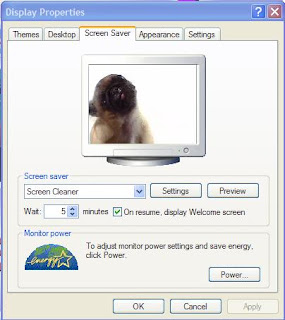
Last but not least, this is the flash that I have converted into the screensaver, called the Screen Cleaner. If you like it, you can download it here [Flash Version] and convert it yourself. Happy trying! :-)


The Screen Cleaner


(Read More...)

Bookmark this post:
Ma.gnolia DiggIt! Del.icio.us Blinklist Yahoo Furl Technorati Simpy Spurl Reddit Google

Hate Long Web Addresses? Make Them Shorter URLs

3 comments - Post a comment

Make Long URL shortThere are dozens of Free URL shortening (and redirecting) services available on the internet. Obviously, we would go for this service purposely to make the looooooooooooong web address into a much shorten one and the second reason is to hide our affiliate links.

To cut long story short, let looks at my shortlisted URL shortening services with their features.

1. TinyURL [*TinyURL!] - The least preferred URL shortening service on the list. Why? Because TinyURL will automatically generate a random URL for you, something similar to this http://tinyurl.com/32xqr9. You don't like it? Me either. On the plus side, you get to preview the actual web address redirect by the shorten URL before proceed to the actual site, but first you must have the preview feature enabled.

2. urlTea [*urlTea!] - Slightly different from TinyURL, at which you can describe the generated random URL into meaningful text by adding ?any-text-you-like after the URL. Here's an example, http://urltea.com/2h5r and http://urltea.com/2h5r?usb-thumb-drive-for-lunch , they mean the same. Both links will lead you to the same site.

3. MooURL
[*MooURL!] - Similar to TinyURL, you get a random web address, something like this, http://moourl.com/uhqeu but you have a choice to personalize your URL (up to 20 characters) into something more meaningful like http://moourl.com/thumb_drive_4_lunch .

4. Shorl [*Shorl!] -You get random generated URL but no worry because when a user clicks the shorten URL, the user will be shown the actual web address for a few seconds before arrive to the actual site, so user knows where is he/she heading for. This is similar to the preview feature of TinyURL. Another advantage is that you get to track how many hits you get for the URL.


5. Snipr [*Snipr!] - The best of all. You can sign up for an account, personalize your URL, assign private key to your shorten URL, track the number of hits for each URL and multisnip - meaning convert multiple URLs at once. Cool huh? What more can you ask for?

* Drag your preferred URL shortening service's bookmarklet into your browser's bookmark tool and create short URLs with just a click.

So which one are you going to pick?

(Read More...)

Bookmark this post:
Ma.gnolia DiggIt! Del.icio.us Blinklist Yahoo Furl Technorati Simpy Spurl Reddit Google

How to Sleep in Class Without Getting Caught?

Be The First to Comment - Post a comment

Well, the yesterday 3-hours long class was a slightly boring class with the lecturer doing most of talking part and we students sitting quietly and listened to what he have to say. Boringggg... If this kind of situation happens every week, it will not takes long to get me into sleep. So suddenly I came out with an idea, "hey, why don't I put myself into sleep during the class but without getting caught?" For me, to sleep during the class is not a big deal, but not to get caught by the lecturer is the hardest part of it. The price for getting caught sleeping in the class is very HIGH!!

So I start searching the whole web looking for useful tips on secret to sleep in class without getting caught. There a score of web sites which I found it useful, they are this site, this site and this site. These sites listed a near-to-complete guides on how to sleep in the class without getting caught.

Here is the quick steps that you (and I) may want to practice to experience an uninterrupted sleep in the class. (hopefully)

1. Sit in the back of the room

2. Have something on your desk, be it a book ( make sure the book is open) , a pencil box etc

3. Leaning on one arm and point your face down at the desk ( yes, you are studying your book or notes with your eyes close. )

4. No Snoring zzzzzz

Next time, if you want to sleep in the class, remember this steps and remember to get the copy of homeworks or notes from your friend after the class.

I guess you don't take me seriously when I said I am going to sleep in the class right? On the second thought, bringing my favourite stock investing books to read will bring more benefit to me than falls into sleep in the class.

P.S. : Be careful while you sleep in the class especially when the teacher is not around, because your classmates may up to something no good. Watch the video and you know what I mean! You may experience the pain, oouchh!!!!! That's hurt!


(Read More...)

Bookmark this post:
Ma.gnolia DiggIt! Del.icio.us Blinklist Yahoo Furl Technorati Simpy Spurl Reddit Google

The Smart Way to Cheat in Exam

Be The First to Comment - Post a comment

To be honest, I used to cheat in exam during my time in secondary school. Just a few times. When I think of it back, I feel really lucky because I never get caught for cheating in exam. Yes, I know I am smart enough not to get caught.

Well, cheating in exam is very risky and is a really bad idea because it doesn't worth it once you get caught. But how if you know a smart (?) way to cheat in exam? If you are bad at memorizing facts for exam, you might want to try this method. Just sit back, watch the video and learn. All you need are a bottle of coke (or any drinking bottle), scanner and printer.


P.S. : Remember, try it at your own risk!

Source : AhBoon.net

(Read More...)

Bookmark this post:
Ma.gnolia DiggIt! Del.icio.us Blinklist Yahoo Furl Technorati Simpy Spurl Reddit Google