I often came across a lot of interesting webpages while blog walking but sometime I found so little time to read them all at that time. So in the end I have to skip some of the posts and some of it I bookmarked, so that I can read it later. That was what I did last time, but now I am using
toread.
Toread is a email-based free bookmark service that allows you to send webpages to your email account.
This bookmark service is available for both IE and Firefox users. Toread come in handy when you came across a hand full of interesting blog posts but couldn't find the time to read at the very moment. So by simply click on the "toread" bookmarklet, the webpage will be forwarded to your email account. When you are free, you can always read the previous bookmarked webpages from your email.

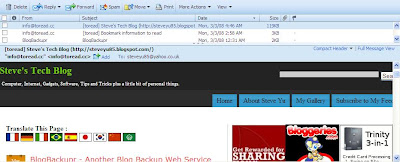
Here is a screenshot of the email containing the webpage (it's my blog actually) that I've bookmarked using Toread.
Toread Mobile / Tomobi
Toread also available to mobile users. Tomobi will convert toread web page into text-only content, and send it to your mobile device.
Check out toread @ toread.cc | For additional info, please refer to toread "how to use" page.
(Read More...)
Labels:
Internet,
Web Tool
I have covered about
BlogBackupOnline some time ago. Well, BlogBackupOnline is not the only blog backup service available online. It has a friend, named
BlogBackupr. Basically, these two blog backup services are quite similar. So you may want to choose only one blog backup service to do the backup.

Here is several items to take note about BlogBackupr.
- BlogBackupr works for all blogs that have a RSS-feed (Blogger and Wordpress's blog are included)
- The backup will include all posts, comments and categories
- Doesn't backup media files e.g. images and blog template. (This service may available in the future.)
- Will automatically performs a daily incremental backup
- You can export your blog to desktop in XML, HTML or TXT format.
- Support automatic restore to your Blogger or Wordpress blog.
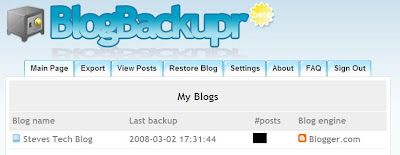 The Dashboard
The features offer by both BlogBackupOnline and BlogBackupr are similar except that BlogBackupOnline supports media files backup while the other doesn't. So that's what differentiate both services. So,
I go for BlogBackupOnline.
And you?
(Read More...)
Labels:
Blogging,
Internet,
Tips n Tricks
So have you read today's newspaper? Well, you should must read it. It has nothing to do with the coming Malaysia's general election (I am not interested on that though). It’s about my blog new Google Page Rank! Yes, finally my blog get it’s first Page Rank from Google. I started this blog on the end of November and after three months waiting for my first Page Rank update, the day has finally come and here is my new Page Rank, from ZERO to FOUR (unofficial)!
Here is the piece of news that I am yelling about just now, in case you want to read it. Just read the headline. :-)
 Anyone getting the New Page Rank update?
Have your blog receive the new Google Page Rank? If yes, share your good news with me! And praise me also. I love that!
P.S. : I've tried to confirm my Google Page Rank on major datacenters using iwebtool but the results are not as what I expected. Maybe it's too early for me to celebrate. :-(
(Read More...)
Labels:
Uncategorized
Have you ever came across any web applications or services that you might think it's not necessary to use it at all? Well, I have two here (manage to find two only). So let take a look at these two web services.
1. ReferHide
ReferHide.com will hide your website's referrer information from website's that you link to.
Unless you are putting links to porn sites or any illegal sites on your blog, otherwise you have no reason not to let the website that you link to, to know that your blog is the referrer right? So you don't need this web application at all!
2. StumbleUpon Checker

StumbleUpon Check (sucheck.com) is a web application that allows you to easily verify that a page has been stumble (on StumbleUpon) by a certain user.
... You'll be given a Status (it'll show if the user actually stumbled that page or not) and you'll also be given a Certification Image.
So basically, you might want to use this service to verify that you have stumbled a page, especially when doing stumble exchange with other bloggers. StumbleUpon Checker will then rewards you with a certification image or I called it "Stumble Certificate". But no thanks, for me, it's just a lame web application and most of you don't really care about this.
Well, if you do want such certificate, I will reward one to you. Just stumble this post and you'll get your certificate. Here is an example. :-)

Anymore to add?
Any other web services that come across you mind that you think don't bring any good to you? Leave me a comment to share it. :-)
(Read More...)
Labels:
Internet
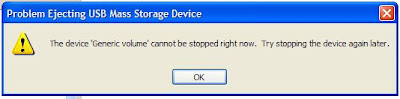
Other than using
Unlocker , there is another good alternative to eject my USB flash drive with ease and forget about the frustrating moment seeing the error message from Windows' default device removal tool.
 USB Disk Ejector
 is a free Windows application that allow us to quickly eject our USB flash drives and any other USB devices in Windows.
USB Disk Ejector also come in handy when we have a couple of USB devices to remove. I hate the slow normal way to eject my USB device, especially when I have more than one USB devices to remove, I am sure you don't want to waste time on that right?
How to use the USB Disk Ejector?
Get yourselves a copy of USB Disk Ejector. Once downloaded, extract the freeware to your desktop. To eject your USB devices, simply open the USB Disk Ejector and you will see the similar image below. Follow the given instruction as displayed and you're done!

If you have problem to eject your usb gadgets (seeing the error messages) and would love to save time when you have a handful of usb gadgets to eject, you should give USB Disk Ejector a try or else just stick with the usual method. :-)
Credit : MohdHafez.net
(Read More...)
Labels:
Freeware,
Tips n Tricks


