Nobody wish to see their blog turn into disaster the next day and can't do anything to rescue it because they never run blog backup the day before. So blog backup is crucial because we never know what going to happen to our blog the next day. Trying to
manually back up your blog is complex and time consuming, you sure don't want spend a lot of time on it right?

So if you are looking for a web service that can help you backup your entire blog content with ease,
BlogBackupOnline is the answer. You'll only need to set up BlogBackupOnline once, and then you stop worrying about back up ever again because BlogBackupOnline will manage all the backup tasks for you.
Back Up Your Blogger Blog Online
The sign up process is quick and simple, all you need to do is fill up the sign up form, register your blog and ready to start your first full blog backup. If you want to backup image files, make sure you check the option shown below.

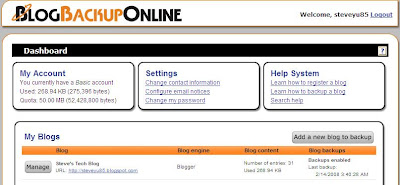
After the full backup has completed, you will then be able to manage the backup of the blog from the dashboard. BlogBackupOnline will automatically performs a daily incremental backup to find new posts, new comments, and other changed content.
Export Your Blog to Desktop
You don't get unlimited storage to store all your blog back up files on the web. You are only allocated 50 mb for the back up purpose. So you might want to export your blog to desktop. Here's how. From the dashboard, click the "Manage" button for the specific blog that you want to export. Then select the "Export" tab and click the "Download export file" button. If in case you do run out of space, you can always ask for more space by emailing BlogBackupOnline at morespace [at] techrigy [dot] com.

Happy Trying!
(Read More...)
Labels:
Blogging,
Internet,
Tips n Tricks
Previously, I have shown you how to
convert flash movie into a windows-based screensaver by using a free web service, called
Creamshavers. Besides creating your flash based screensavers directly from the web, you also can choose to do it from your desktop. All you need is
InstantStorm.

InstantStorm is a Windows freeware tool for creating Flash based screensavers with many advanced features. All you have to do is to choose a SWF file, set screensaver parameters and compile an executable installer. All 32-bit and 64-bit versions of Microsoft Windows are fully supported, including Windows 95 and Windows Vista. And the best of all—there are no nag screens or other annoying stuff. Unlike many other tools, InstantStorm allows you to fully customize your screensaver's about box, installer and uninstaller including all texts.
Create Your Screensaver in 3 Simple Steps
There are plenty of options to customize your screensaver, but if you choose not to get headache with all the options, you can use the New Project Wizard (most prefer to beginner) and get your screensaver done in 3 simple steps.

Download InstantStorm! | Download Sample Flash Movie
(Read More...)
Labels:
Flash,
Freeware,
Internet,
Tips n Tricks

Just a short post today and I guess you know what day it is tomorrow right? So, here I am taking this opportunity to wish all Chinese people out there, no matter where you from, a
Happy and Prosperous Chinese New Year of Rat. Forget for a while all your school assignments, your unfinished works and any problems, you can deal with it later. The only thing that you can do at this moment is to enjoy yourselves on CNY with your family members, friends and not to forget, your loves one. Happy Chinese New Year! :-)
Can I have CNY greetings and wishes from you? Just throw me some! :-)
P.S. : You know what is the great thing about Chinese New Year? well, of course the "Ang Pow"!
(Read More...)
Labels:
Special Event

What is the biggest event of this year? Of course, it is the
Beijing 2008 Olympic Games , with another 186 days to go. So have you seen any of the Beijing Olympic inspired gadgets? If no, then let take a look at this cool
Lenovo-designed gadgets.
1. Beijing Olympic Torch

Here is some key facts about the Beijing Olympic Torch.
The torch is 72 centimetres high, weighs 985 grams and is made of aluminium. The torch is of a curved surface form, with etching and anodizing being used during its production. A torch can usually keep burning for approximately 15 minutes in conditions where the flame is 25 to 30 centimetres high in a windless environment.
The torch has been produced to withstand winds of up to 65 kilometres per hour and to stay alight in rain up to 50mm an hour. The flame can be identified and photographed in sunshine and areas of extreme brightness. The fuel is propane which is in accordance with environmental guidelines. The material of its form is recyclable.
2. Beijing Olympic Laptop , 'Xiang'

'Xiang', official laptop for Beijing 2008 Olympic games this summer. Details suggests a 12.1-inch XGA display and Intel’s L2400 Core 2 Duo processor, price is yet unknown but believed would be something beyond market price due to the limited numbers of laptop available.
3. Beijing Olympic USB Pen Drive

Any more? Well, this is all Lenovo have at the moment, but there will be more gadgets revealed to public before the games starts on August. And would you like to view the other Beijing Olympic inspired gadgets? I mean the unlicensed one? Check it out here.
Credits : Engadget
(Read More...)
Labels:
Gadgets
If you love the previous collection of
adorable USB Speakers, then you sure don't want to miss this collection the cutest USB Web Cams too. Let check it out, will you - The 10 Most Adorable USB Web Cams ... according to me!
1. Happy-Kid
2. Q Dog

3. Bubble Head
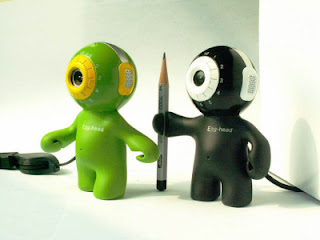
4. MyPet Monkey

5. Panda

6. Doggie Donny

7. Doraemon

8. Garfield

9. Robot

Last but not least, how about a smelly foot at the top of your computer screen?
10. Foot
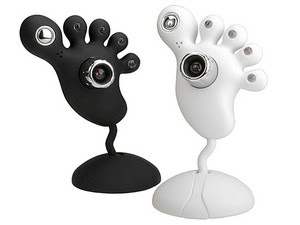
Mind if I ask you a question ? Which one do you pick as your favorite?
Credits : Gizmodo , OhGizmo! , GadgetMadness
(Read More...)
Labels:
Gadgets


